Train-Sim.Com
MSTS Cab Design

New ComCab Update - comcabdk

Notice to all visitors and members of the Train-Sim.Com message forums:
If you plan on using a signature banner in your posts, we would like to remind you that there is a maximum size for banners. That maximum is 450 pixels wide by 120 pixels high, and not to exceed 25k. Your compliance is appreciated. FORUM RULES Problems? There are two common reasons for problems with logging in and posting messages. The first is that you are running a firewall that prevents your messages from being sent to the server. The other is that you have cookies disabled; the DCForum software requires cookies to work properly.

Previous Topic | Next Topic

Printer-friendly copy Email this topic to a friend

Reading Topic #547

Charter Member · 62 posts

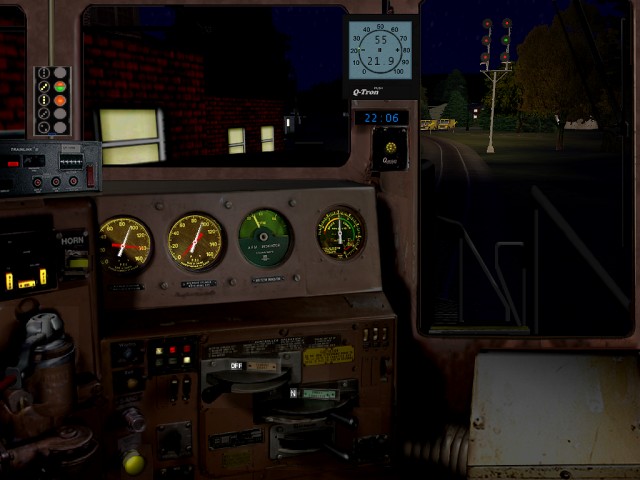
I have uploaded a new dark cab interior update for comcab, named comcabdk.zip. It includes all past upgrades for comcab, cabsignal and nighview.This update is meant to be entirely optional. Ever since I did the nightview update, I have been asked if the dark cab interiors from nightview could be used for day light running. That is what this update is for.New ComCab Update - comcabdk – image 1As you can see from the above NS cab pic, you will have the dark interior with console and Gage lighting on while running in day light, note the clock time is 10:08. If you should want this type view then comcabdk is what you want. If you want to stay with the normal lighter cab interiors then there is no reason to install this update.I will be updating all the past cab views that have been released so far to dark interior and all new releases will be in both light and dark interior versions, so you have a choice of which way you want to go.Don

Alert | IP

Printer-friendly page | Edit | Reply | Reply With Quote | Top

RE: New ComCab Update - comcabdk, kyleh24, Feb-22-04, 09:48 PM, (1) RE: New ComCab Update - comcabdk, dcrano, Feb-22-04, 11:00 PM, (2) RE: New ComCab Update - comcabdk, stephenburr, Feb-24-04, 12:26 PM, (3) RE: New ComCab Update - comcabdk, stephenburr, Feb-24-04, 12:29 PM, (4) RE: New ComCab Update - comcabdk, dcrano, Feb-25-04, 05:36 PM, (7) RE: New ComCab Update - comcabdk, Mark_Blum, Feb-26-04, 00:16 AM, (9) RE: New ComCab Update - comcabdk, NW_611, Feb-25-04, 11:15 AM, (5) RE: New ComCab Update - comcabdk, dcrano, Feb-25-04, 05:35 PM, (6) RE: New ComCab Update - comcabdk, NW_611, Feb-25-04, 09:04 PM, (8) RE: New ComCab Update - comcabdk, dcrano, Feb-26-04, 06:26 AM, (10) RE: New ComCab Update - comcabdk, mopac7000, Feb-26-04, 11:33 AM, (11) RE: New ComCab Update - comcabdk, dcrano, Feb-26-04, 06:58 PM, (12) RE: New ComCab Update - comcabdk, mopac7000, Feb-27-04, 00:00 AM, (13) RE: New ComCab Update - comcabdk, Claude350, Feb-27-04, 04:40 AM, (14)

Conferences | Topics | Previous Topic | Next Topic

Charter Member · 477 posts

RE: New ComCab Update - comcabdk

New ComCab Update - comcabdk – image 2

LAST EDITED ON Feb-22-04 AT 09:54 PM (EST)

Don, thanks for the options. As I stated when I made my first darkened cab, it is the most realistic when darkened. Every engine I've ever been in, it seems dark. You might not see those back light gauges in the daytime, but the cab IS that dark. Nice job!
Kyle
Here is my engineer Bruce, on a summer day with blazing hot sun with no cloud cover, and it still looks dark in there...

Attachments
New ComCab Update - comcabdk – image 3
http://www.train-sim.com/dcforum/User_files/40396b3d68d12faa.jpg

Alert | IP

Printer-friendly page | Edit | Reply | Reply With Quote | Top

Charter Member · 62 posts

RE: New ComCab Update - comcabdk

Kyle, thanks for the kind words.The stand and gauge lights are sort of a compromise, or in plain english I am getting lazy. I have the option of on off on all lighting and backlighting with layers. But then I thought well I start doing some one way and others the other, well it was just so much simplier to do it all one way, and it works for day or night running as well. There are a few new things in the works, and the lights on work very well for them.Now all I have to do is get about 30 dark interior cabs uploaded to match the older light interior. BTW Bruce sure looks happy sitting there in that hot sun.Don

Alert | IP

Printer-friendly page | Edit | Reply | Reply With Quote | Top

Charter Member · 268 posts

RE: New ComCab Update - comcabdk

The new SD45 Southern just appeared in the library and I know that there are other SR freight units as well, all high hood. Would you do a high hood version of your cab interior for Southern units? or is there something already available that would work?

Steve Burr

Alert | IP

Printer-friendly page | Edit | Reply | Reply With Quote | Top

Charter Member · 268 posts

RE: New ComCab Update - comcabdk

There's also the NW bicentennial SD45 as well. But a cab for that and the other bicentennial, patriotic schemes would probably be too much to ask. Just an idea. Great renditions! Keep up the good work.

Steve Burr

Alert | IP

Printer-friendly page | Edit | Reply | Reply With Quote | Top

Charter Member · 406 posts

RE: New ComCab Update - comcabdk

Just to make things more interesting, the SD45 Southern units were not only high nose, but LONG nose first.These cabs are truly a great addition to the game in any case!Thanks!Mark
A Southern Railway Fan

Alert | IP

Printer-friendly page | Edit | Reply | Reply With Quote | Top

Member since Apr-8-03 · 749 posts

RE: New ComCab Update - comcabdk

New ComCab Update - comcabdk – image 4

A couple of questions:1. I've gone through and installed the dark update per the instructions, as an update. The original EMD cabview folder is now "EMD-Light" or something like that; the dark folder is now "EMD". When testing the Chessie System low-nose and Norfolk Southern high-nose dark views at night, the front of the locomotive (i.e. the part visible in the ace) is lit up as if floodlights were upon it. Is this a problem on my end, or was it a known result of the darkview? 2. It's my understanding that Norfolk Southern doesn't particularly care for spending money on cab signals. Thus, I'd made an effort at equipping only ex-Conrail units with one set of the cab signals or another; ex-SOU/ex-N&W and NS-bought locomotives came without cab signals. So far, the original distribution of cab signals that I had with the daylight views seems to have held up, which surprises me. I had thought that I'd be seeing cab signals in each locomotive now, so I'm stumped. Review of the inlcuded pictures with the NS dark set shows that I should be seeing cab signals in the high-nose view, but I'm not. Any clarification you can give here would be appreciated. If nothing else, I'd like to know how to perhaps create CVFs or whatever such that I can maintain the split between ex-CR and NS units in terms of signals. Thanks for your work; it's added considerably to the enjoyment of the game.

____________________________________________________________________
Norfolk & Western’s Radford Division, Pulaski District: Who needs the Marias Pass?

Alert | IP

Printer-friendly page | Edit | Reply | Reply With Quote | Top

Charter Member · 62 posts

RE: New ComCab Update - comcabdk

If you look inside your EMD folder, you will see a folder named Nightview, inside it is a text file named install.txt. Read and follow directions and you should end up with a cab view as such.New ComCab Update - comcabdk – image 5
Please note the Lighter and Darker interior versions are not for night time running, they are for day light running, just your choice of light or dark interior.As far as the cab signals, not sure what problem you are having, there should be no difference between light and dark interior cabs if you are have installed cabsig update for the light interior versions, the dark interior already has the same update. Note the CVF's are the same calls so if you had cab signals for the light interior versions, there is/was not reason to change CVF files at all, if you added different cab signals then they would need to be added as well.If none of this makes sense, please Email me dcrano@neo.rr.com with more details on the problem and I will see what we can do.DonDon

Alert | IP

Printer-friendly page | Edit | Reply | Reply With Quote | Top

Member since Apr-8-03 · 749 posts

RE: New ComCab Update - comcabdk

New ComCab Update - comcabdk – image 6

To the first point: Ah, OK. Daylight-only operations! I thought that might be what I was going to be stuck with, not what I began with. Thanks for pointing that out. I suppose I was sort of confused from the whole mention of the generic night-time nose view. With regards to the second part, I realized later what I'd done. Sure I installed the new ace files and whatnot, but I didn't replace the CVFs in the individual locomotive folders. I hadn't aliased them so of course the cab signals weren't being referenced. Duh. I know what the issue---not a problem per se---is now and can deal with it on my own. That's going to involve strict conversion to the Cab80d set instead of my current no signal/original signal/Cab80d policy. Thanks for your answers.

____________________________________________________________________
Norfolk & Western’s Radford Division, Pulaski District: Who needs the Marias Pass?

Alert | IP

Printer-friendly page | Edit | Reply | Reply With Quote | Top

Charter Member · 62 posts

RE: New ComCab Update - comcabdk

If you want to change any CVF supplied with my cab views between having and not having cab signals here is what you need to do.Look near the top of the CVF for this line:CabViewControls ( 26Change to:CabViewControls ( 25Now near the bottom of the CVF look for: CabSignalDisplay (
Type ( ASPECT_DISPLAY CAB_SIGNAL_DISPLAY )
Position ( 30 66 45 70 )
Graphic ( "..\\..\\Common.Cab\\EMD\\Cabsignal-Cab80d.ace" )
)And remove completely. This will totally remove the call to any cab signals.If you would like to use one of the other supplied cab signals, supplied with orginal cab views, and darker in COMCABDK as well, then do not change:CabViewControls ( 26Leave as is, then edit:Graphic ( "..\\..\\Common.Cab\\EMD\\Cabsignal-Cab80d.ace" )To match the name of the desired cab signal:
Cabsignal.ace or Cabsignal-SL.aceIf you have some other cab signal you would like to use, place the ace file for it in the EMD folder, and change the Graphic line above to call it, make sure you leave the full path as above and just change the file name above as:
Graphic ( "..\\..\\Common.Cab\\EMD\\Your cabsignal.ace" )Don

Alert | IP

Printer-friendly page | Edit | Reply | Reply With Quote | Top

Member since Dec-23-03 · 24 posts

RE: New ComCab Update - comcabdk

LAST EDITED ON Feb-26-04 AT 11:37 AM (EST)

Hi Don, I downloaded your comcabdk.zip this morning very early and set it up per instructions and was checking out the cabview alias file before running it in an act. I went to Common.Cab/Emddark/Nightview/Alias/Low Hood and opened the sd402_night.cvf and all the ace file entries were pointing to
..\\..\\Common.Cab\\EMD folder on my system. I was unable to use your new install option 1 from your readme file as I already had an EMD folder-so I had to leave it named Emddark.
I went into the sd402_night.cvf and added the word -dark- behind -Emd-in every ace file line
It originally looked like this for every ace file entry
..\\..\\Common.Cab\\Emd\\sd402front1024.ace
and I changed them to
..\\..\\Common.Cab\\Emddark\\sd402front1024.ace
and etc. for the rest
I wanted to let you know as some others may already have an EMD cabview folder in the Common.Cab folder like I do
Nice job on the night cabview by the way--I like it!! MP7K

Alert | IP

Printer-friendly page | Edit | Reply | Reply With Quote | Top

Charter Member · 62 posts

RE: New ComCab Update - comcabdk

mopac;Thanks for the heads up on this one. That is one I had not thought of. My idea was to make things so one would not have to edit the CVF's, that is why the folder scheme and optional included batch file to rename EMD to EMDLIGHT, and EMDDARK to EMD. I did not think of someone might already have an EMD that was not part of COMCAB.ZIP.I will have to release an optional set of CVF's for nightview to cover that, no big deal, I just hate to have someone have to edit the CVFs that are not sure what they are doing.The idea of the original renaming was to cover the time period while I got the darker interior cabs done, but as it turned out it really was/is not needed, as I got the darker interior cabs done to replace the original lighter interior views about the same time I finished COMCABDK.ZIP.The other thought this brings to mind, is what about all the dark interior cabs, if someone wants to keep EMD intact, they might need the same for all those as well.Don

Alert | IP

Printer-friendly page | Edit | Reply | Reply With Quote | Top

Member since Dec-23-03 · 24 posts

RE: New ComCab Update - comcabdk

Well I never downloaded any of your daylight style cabs as I've been painting my own noses for some time and aliasing back to a milwemd cabview that another simmer did of Alex Halls original.All you'd have to do is upload alternate cvf's for whatever cabview you want it to point to--so far you have only 2 folders in the Common.Cab folder--so its pretty simple at this point!! MP7K

Alert | IP

Printer-friendly page | Edit | Reply | Reply With Quote | Top

Charter Member · 1914 posts

RE: New ComCab Update - comcabdk

Don I didn't have any problems at all.Since I'm using the cabs with the darkened interior for day time use I made a backup of the original EMD folder then placed all the darkened interior cabs in the new EMD folder.I then placed the nightview folder in the units that I've updated so far and renamed the sd402_night to sd402.I've switched back and forth with no problems at all.It works really well.I didn't have to edit any lines in the sd402.cvf files at all.

Claude350 NS Piedmont Division Raleigh East

Alert | IP


[ Home | MSTS Forum | MSTS FAQ | File Library ] Copyright © 2004 by Nels Anderson. All Rights Reserved.

Restored from the Train-Sim.Com archive, captured May 17, 2004. About this archive.