
Train-Sim.Com
MSTS Cab Design

Scalemaker-very useful utility for MSTS cab designers

Scalemaker-very useful utility for MSTS cab designers – image 1

Notice to all visitors and members of the Train-Sim.Com message forums:
If you plan on using a signature banner in your posts, we would like to remind you that there is a maximum size for banners. That maximum is 450 pixels wide by 120 pixels high, and not to exceed 25k. Your compliance is appreciated. FORUM RULES Problems? There are two common reasons for problems with logging in and posting messages. The first is that you are running a firewall that prevents your messages from being sent to the server. The other is that you have cookies disabled; the DCForum software requires cookies to work properly.

Previous Topic | Next Topic

Printer-friendly copy Email this topic to a friend

Reading Topic #259

Charter Member · 186 posts

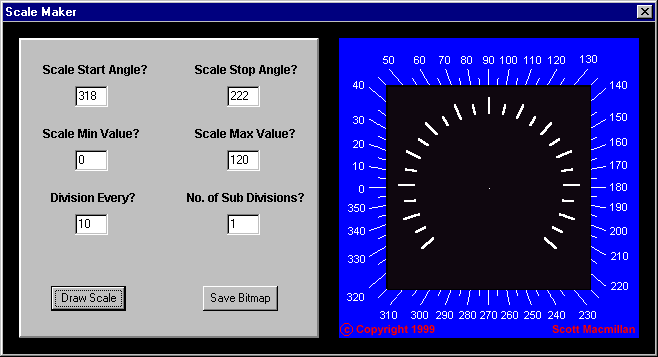
In the course of my surfing I came across a neat little utility called Scalemaker, which can make dials with any given start and stop angles, main divisions, and subdivisions. I actually found this program in a collection of FS2000 utilities, but thought it would also be useful for MSTS cab designers. Laying out the divisions for a custom dial is a real pain, and this should make everyone's life easier. The program gives a preview of the dial, and can save the result in a standard .bmp file. You can then change the dial and division colors, add markings, and so forth with the image editing software of your choice.You can download it here:http://www.simviation.com/files/1misc/scalemaker.zipHere's a screenshot:Scalemaker-very useful utility for MSTS cab designers – image 2
Attachments
Scalemaker-very useful utility for MSTS cab designers – image 3
http://www.train-sim.com/dcforum/User_files/3d99004d615ab7ed.gif

Alert | IP

Printer-friendly page | Edit | Reply | Reply With Quote | Top

Restored from the Train-Sim.Com archive, captured October 2, 2002. About this archive.