
Train-Sim.Com
MSTS Cab Design

Controls problem

Controls problem – image 1

Notice to all visitors and members of the Train-Sim.Com message forums:
If you plan on using a signature banner in your posts, we would like to remind you that there is a maximum size for banners. That maximum is 450 pixels wide by 120 pixels high, and not to exceed 25k. Your compliance is appreciated. FORUM RULES Problems? There are two common reasons for problems with logging in and posting messages. The first is that you are running a firewall that prevents your messages from being sent to the server. The other is that you have cookies disabled; the DCForum software requires cookies to work properly.

Previous Topic | Next Topic

Printer-friendly copy Email this topic to a friend

Reading Topic #223

Member since Jul-31-02 · 4 posts

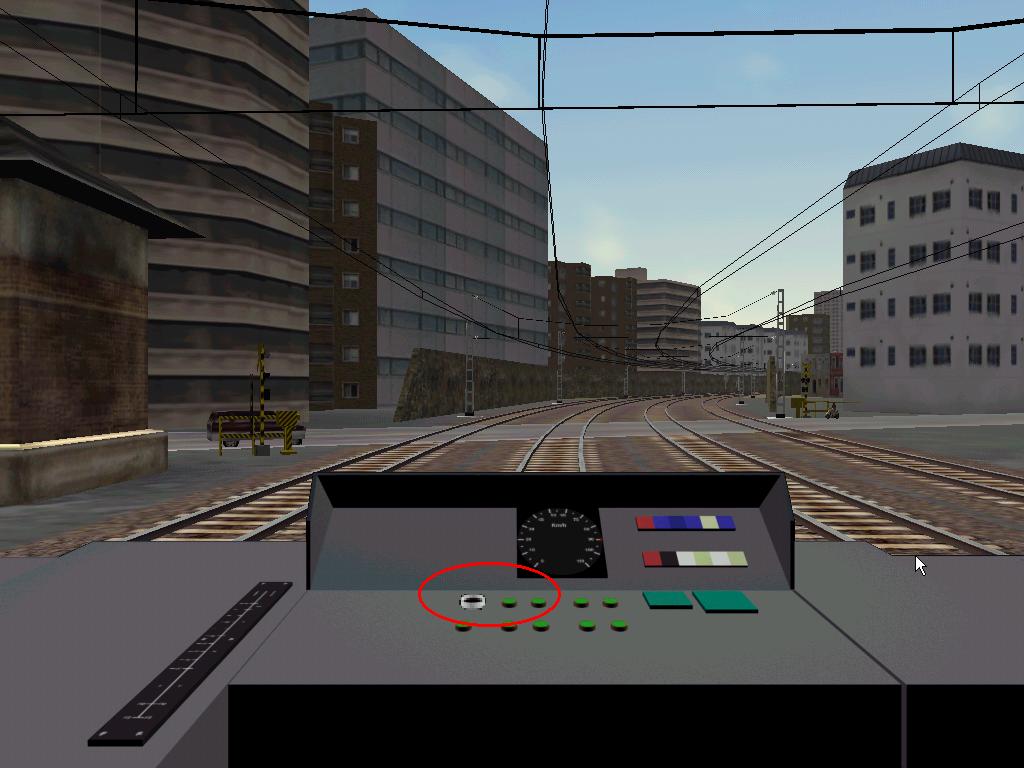
Hi all,I've started my first cab, but i have a problem about controls:First, i've modelled a "cab" with a few buttons. That's OK. I use the 3ds max render to get the TGA file I use as background image.Then, I hide all elements but not the button I want to animate. I render it two times; "normal" position and "pressed" position.Then i went to Photoshop and made the TGA which has the two frames.Then, I use makeace, makeacewin or tgatool2 to export to ACE format, but when I run the game, the button has increased his size!!!What can I do?
Thank you.orique.( PS: Sorry for my bad english... -- I hope the attached file will help you to understand this message )

Attachments
Controls problem – image 2
http://www.train-sim.com/dcforum/User_files/3d585f5813144ac5.jpg

Alert | IP

Printer-friendly page | Edit | Reply | Reply With Quote | Top

RE: Controls problem, kyleh24, Aug-12-02, 10:23 PM, (1) RE: Controls problem, ctillier, Aug-13-02, 08:36 AM, (2) RE: Controls problem, DrJimi, Aug-13-02, 07:26 PM, (3) RE: Controls problem, ctillier, Aug-14-02, 04:47 PM, (7) RE: Controls problem, DrJimi, Aug-14-02, 07:41 PM, (9) RE: Controls problem, orique, Aug-13-02, 07:28 PM, (4) RE: Controls problem, DrJimi, Aug-13-02, 07:44 PM, (5) RE: Controls problem, kyleh24, Aug-13-02, 11:07 PM, (6) RE: Controls problem, DrJimi, Aug-14-02, 07:33 PM, (8) RE: Controls problem, kyleh24, Aug-15-02, 11:58 PM, (10) RE: Controls problem, ctillier, Aug-16-02, 02:21 PM, (11) RE: Controls problem, DrJimi, Aug-16-02, 09:51 PM, (12)

Conferences | Topics | Previous Topic | Next Topic

Charter Member · 183 posts

RE: Controls problem

Every problem I ever had with ace file sizes boiled down to not having the correct version of Makeace selected. Even when I thought I had the updated (latest) version, I discovered that I had overwrote my "latest" version, when I had reloaded MSTS. Make absolutely sure you have the correct version on your hard drive, and have it selected in TGAtool2
See the post here<http://www.train-sim.com/dcforum/DCForumID8/2859.html#16> Here is a quote from MartinProviding you have "Updated Makeace" or "Patch#1 Makeace" selected then it will automatically do the following for odd sized images :-Set the -BMP flag (same as "Create Bitmap")
Clamp the size to the true size of your image
Create a temporary version of your image with the Canvas expanded to the next biggest "square, power of 2" size
Run Makeace on the temporary expanded image.

Kyle H

Alert | IP

Printer-friendly page | Edit | Reply | Reply With Quote | Top

Charter Member · 191 posts

RE: Controls problem

Assuming you're using MakeACEWin...Once you've created your .tga file, add some margin (increase canvas size) so that each dimension of your .tga file is some power of two (8, 16, 32, 64, 128...). The image need not be square, but the sides must be a power of two, and your frames need to be located in the upper left corner with the extra space added to the right and to the bottom.In MakeACEWin, indicate the correct clamped output size.Cheers,

--
Clem
Controls problem – image 3
http://www.tillier.net/speedworks/index.html

Alert | IP

Printer-friendly page | Edit | Reply | Reply With Quote | Top

Charter Member · 42 posts

RE: Controls problem

You know guys (Clem & Kyle), I've created countless odd-sized control animation multi-frame files by now and have never had to do the "size up to power of 2" process. However, I'm not using the alpha channel to mask any areas. Maybe that makes a difference? My process is usually...
1. Start with 640x480 BMPs showing each control position I want
2. Decide the area I need for each animation frame and create a blank BMP to hold the total number required e.g. 4 frames wide by 3 deep, or whatever.
2. Crop the area I need for the animation frame from a BMP and paste it into the right "slot" in the multi-frame BMP
3. Repeat with each "input" BMP until all frames done.
4. Use TGATOOL2, load big BMP (odd-size) and save as ACE (no alpha).Always fits perfectly into the cab.Strangely, I've never sized-up any of my cab front/left/right images either, and they do use the alpha channel. Process there is:1. Use POV-Ray to create BMP @ 1024x768
2. Edit with PSP7
3. Select window areas, new mask - hide selected, save to alpha channel.
4. Save file a non-compressed TGA (still 1024x768).
5. Resize to 640x480 and re-save as TGA (so I have both sizes needed).
6. Use WinMakeAce, input is the TGAs, output is ACEs, select the "create bitmap for cab backgrounds" option, but do not enter any clamp values.The resulting ACEs seem to scale just fine and do not look at all distorted (e.g. vertical stretch). I usually run MSTS @ 1280x1024.I detail all the above, because I've read the need to size up the image several times, but I'm still not clear as to why.I'm prepared to believe I'm doing something wrong, but the results I'm getting seem fine (i.e. the cabview I see in-game looks exactly like the BMP I get from POV-Ray).Comments? Regards to all, Jimi

Alert | IP

Printer-friendly page | Edit | Reply | Reply With Quote | Top

Charter Member · 191 posts

RE: Controls problem

Hi Jimi,I'm not sure why, but I've always had the power of two problem with MakeACEWin. Apparently TGATool2 takes care of it for you automatically.I have a question about cab background image sizes... I keep reading about the need for two cab sizes, one in 1024 x 768 and another in 640 x 480. I can see why the latter would be needed to create the controls, but do you really need a 640 x 480 cab background? My new cabs don't have that but work fine in 640 x 480, and I checked the MSTS Acela doesn't have a 640 x 480 background either (although it does have a lot of flotsam that isn't ever used... such as a windshield wiper shape file for the cab view, which I guess won't be working before MSTS 2!!). How would you even specify which cab background to use depending on resolution, in the .cvf file?cheers

--
Clem
Controls problem – image 4
http://www.tillier.net/speedworks/index.html

Alert | IP

Printer-friendly page | Edit | Reply | Reply With Quote | Top

Charter Member · 42 posts

RE: Controls problem

Clem, my belief about the 2 different cab backgound image sizes (which I *think* I read in the docs somewhere) was that a 640x480 background should be called (e.g.) cab-front.ace and an (optional) 1024x768 file should be called cab-front1024.ace. The cvf file only references the filename for the smaller one, thus the reasoning for naming the larger one in that manner. Supposedly MSTS is smart enough (modest leap of faith here) to know which one to use for a given screen resolution. I didn't know the Acela used only a large one -- the file name doesn't reflect it, which now makes me curious as to how MSTS does decide which to use and how to scale it.I have seen cabs with only the large graphic (named as per convention above) and wondered how users at less than 1024 resolution could use it. I'm going to investigate this when I get a few spare hours... I'm all for saving time and upload size if one set of files is not really needed.Best regards, Jimi

Alert | IP

Printer-friendly page | Edit | Reply | Reply With Quote | Top

Member since Jul-31-02 · 4 posts

RE: Controls problem

Hi,Thanks to all of you for the replies. Finally I got the damn button working properly.I've found the definitive solution rendering the button at 640x480 instead 1024x768, as I was rendering before.orique.

Alert | IP

Printer-friendly page | Edit | Reply | Reply With Quote | Top

Charter Member · 42 posts

RE: Controls problem

Just an observation that may make part of your cab building easier. I see you are using the alpha channel to mask areas around your switch. However, looking at the switch layout in the picture it does not appear that the switch would hide anything else behind it (pressed or not). In that situation, you do not really have to use the alpha channel and a mask. Simply crop an area closely around the switch (allowing for it's "largest" size -- i.e. un-pressed). Use the exact same coordinates for both frames. Save these frames in a 2-frame BMP and use TGATOOL2 to convert to ACE (no alpha). When using the cab editor to place the frame, use the same coordinates you specified for the crop. The switch will be positioned perfectly and there is no visible seam.This is only possible if the cab control layout does not result in a control potentially hiding another control or display, else a mask must be used.I was lucky with my Series 30000 cab in that I only needed to use alpha for the windows and not for the controls. If you examine my control animation ace files with TGATOOL2 and then use the cab editor to display the control animation areas and properties you'll see how I managed it.Just another idea that may help you.Regards, Jimi

Alert | IP

Printer-friendly page | Edit | Reply | Reply With Quote | Top

Charter Member · 183 posts

RE: Controls problem

Orique, If it worked using 640x480, but wouldn't work at 1024x768, then that tells me that you Do Not have the latest version of Makeace. The older version wouldn't do them bigger tham 640x480.Jimi, what I read from Martins quote is that I don't have to expand my canvas to the next square size anymore, then clamp it to the size it really is. And that the latest version of Makeace does all these things for you and you don't even see it happen. You just get the same sized Ace as the original tga! On the older version of makeace, this was Not the case, and you did have to resize the canvas etc. So, if you never had to do it that way, that's good, and consider yourself lucky. I'm certainly glad that they fixed it. I'm just trying to save others the pain of finding out the hard way that makeace is under your main MSTS directory, and if you ever reload MSTS from the CD, it over-writes your "latest" version with the old one. Cheers, Kyle P.S. Whats your next project? I have sucessfully created a Bat file that changes my cab from night to day!!!

Kyle H

Alert | IP

Printer-friendly page | Edit | Reply | Reply With Quote | Top

Charter Member · 42 posts

RE: Controls problem

Clem - I believe Kyle's comments sum up why the "size up" seems to be no longer needed. I've always used the latest MakeAce, so maybe I just lucked out Kyle - your comments re warning others about application versions are well taken and very pertinant. Same as the "don't save TGAs as compressed" issue. I've always been thankful to others who have posted their experiences and proven methods.Well - I released the day/night 30000 with a batch file to switch them that I tested under Win98se, but MrMike reported that it didn't work right under WinXP. Wierd behavior. Worked one way, not the other. Permenant night cab Easy to swap them manually, but not quite what I intended.Regarding my next (now current) project, I'd always loved the London Underground R Stock train (I forget the author) modeled for MSTS, but it uses the 2000 cab. I just finished researching for cab photos and have started modeling the real cab. Lots of detail to do, so it might take a week or two...or three. I've attached a JPG that shows some of the interior views of the real one. Simple controls (well, it's a 1967 vintage tube train) but I think I can capture the spirit of the thing. I'll doubtless mess with the eng file a little too.This particular stock is designed for "sub-surface" rather than "tube" use, so it will see the daylight some of the time. Now if only someone would model a London Underground route (even if only some above ground parts)...Controls problem – image 5Regards to all, Jimi

Alert | IP

Printer-friendly page | Edit | Reply | Reply With Quote | Top

Charter Member · 183 posts

RE: Controls problem

Jimi, I must be a step behind you. I didn't know you had the bat file done already. I too use Win98se, so I don't know if my bat file works with XP etc either. That is my next step...beta testing.
Since I sometimes have some extreme ideas, I'm going to lay this one on you for your thoughts. It seems highly unlikely that this will work, but here goes anyway...
The cab consist of a main tga (all tga's are compressed to aces).
On top of that are all the aces of the controls. The transparencies allow you to see what is "underneath". So in a sense, it is "layered"My idea is to create a Large ace file that has 2 frames (like an on/off switch) The first frame would be All Transparent. The second frame would be of the Nightview gauges etc.You would create another switch on the cab desktop, next to the headlight control. When "off" it would show the transparent frame, when "on" it would show the night gauges on top of the main tga, but underneath the control aces.The main questions I have are: Can you make an Ace file that large without killing framerates?Is the layered order of the controls in the cvf file in a manner so that if you put this control at the top of the list, that it would show up in the manner (layered order )described above?This brain thought came to me one night right before I went to sleep, so I've not tried any experimentation on it. I have several other projects going on as well, so If anyone wants to try any of this out then go right ahead. If it were to work, we could have a "night light" switch, just like Flight Simulator has. Thoughts anyone ? Kyle

Kyle H

Alert | IP

Printer-friendly page | Edit | Reply | Reply With Quote | Top

Charter Member · 191 posts

RE: Controls problem

Hi Kyle,This concept runs into a problem, which is that each frame in a control's .ace file may not be larger than 256 pixels. Then again you could just split it up into several two_state displays, there's nothing to prevent you from having four or six or more such files, and by playing with the "Area" parameter in the .cvf file you could even get them to have better resolution than 640 x 480. The possiblities are endless. cheers

--
Clem
Controls problem – image 6
http://www.tillier.net/speedworks/index.html

Alert | IP

Printer-friendly page | Edit | Reply | Reply With Quote | Top

Charter Member · 42 posts

RE: Controls problem

LAST EDITED ON Aug-16-02 AT 09:53 PM (EDT)

The idea certainly has merit, but as Clem points out (and I discovered) there are limits to size. I was simply (is anything simple?) trying to have the light switch "illuminate" the gauges using something very close to what you describe. I realized that frames for displays are "stacked" based on order when I built the 2-needle gauge. One needle was always behind the other. Ah ha! Now we put a 2-frame transparent or "lit gauge" graphic over the gauge, but behind the needle. Unfortunately my dash was too wide to get it all to work. The mask was really too complex too. I was loosing detail.However, with the LUR cab I'm doing now there's only 2 gauges (speed, brakes) and they're close together The ideas you and Clem noted have me inspired to experiment again...It would be ultra cool to be able to switch the whole cab from day to night at the flick of a switch. Unfortunately, the ambient light isn't affected by the time of day, else we'd stand a chance at success -- I think.I'm going to start a new post on my new LUR cab so you can see how it's progressing. I'm about 12 hours into it now and have the main structure and panels done. I now need to do the controls and displays and then likely agonize for hours over the lighting. This cab will have a few new tricks, based on what I learned with the last one.Best to all, Jimi

Alert | IP


[ Home | MSTS Forum | MSTS FAQ | File Library ] Copyright © 2002 by Nels Anderson. All Rights Reserved.

Restored from the Train-Sim.Com archive, captured October 2, 2002. About this archive.