Here's my latest playing around. Cab compliments of 3DTrainstuff.
Kyle H
Attachments
http://www.train-sim.com/dcforum/User_files/3d40d7782d36e300.jpg
Printer-friendly page | Edit | Reply | Reply With Quote | Top

Notice to all visitors and members of the Train-Sim.Com message forums:
If you plan on using a signature banner in your posts, we would like to remind you that there is a maximum size for banners. That maximum is 450 pixels wide by 120 pixels high, and not to exceed 25k. Your compliance is appreciated. FORUM RULES Problems? There are two common reasons for problems with logging in and posting messages. The first is that you are running a firewall that prevents your messages from being sent to the server. The other is that you have cookies disabled; the DCForum software requires cookies to work properly.
Previous Topic | Next Topic
Printer-friendly copy Email this topic to a friend
Reading Topic #206
Here's my latest playing around. Cab compliments of 3DTrainstuff.
Kyle H
Attachments
http://www.train-sim.com/dcforum/User_files/3d40d7782d36e300.jpg
Printer-friendly page | Edit | Reply | Reply With Quote | Top
Oh yeah! That will look good with the animation frames tweaked. One small suggestion - assuming you're using the same idea as I am to generate the illuminated gauges/displays (lighting FX in PSP7). I discovered this last night when I created the orange dials for the 30000. Use a single light source from below (maybe slightly below right). Use a 90 degree cone. I set the intensity somewhere around 8-12. Use the lasso tool to select exactly the area you want to light, then apply the lighting effect. It will only be applied to that selected area. I only suggest this as I see a small amount of green color bleed outside the display area. Messing with the smoothing value seems to add a little realism also, such that the light wash is not completely linear across the dial face, but is also not too bright near the perceived "source" (bulb?).Nice work! This night time stuff is becoming fun.Regards, Jimi
Printer-friendly page | Edit | Reply | Reply With Quote | Top
Here's an updated version.
Kyle H
Attachments
http://www.train-sim.com/dcforum/User_files/3d44a7b414ca978e.jpg
Printer-friendly page | Edit | Reply | Reply With Quote | Top
Yup.The one I was ( WAS ) doing looked great until I started trying to get the contols and buttons lighting to matchI hope you can get it goin cause it looks great !Good LuckTim Kent
"Power for You"
96th_Malice
Printer-friendly page | Edit | Reply | Reply With Quote | Top
I can't resist a challenge. The controls took about an hour...KH
Kyle H
Attachments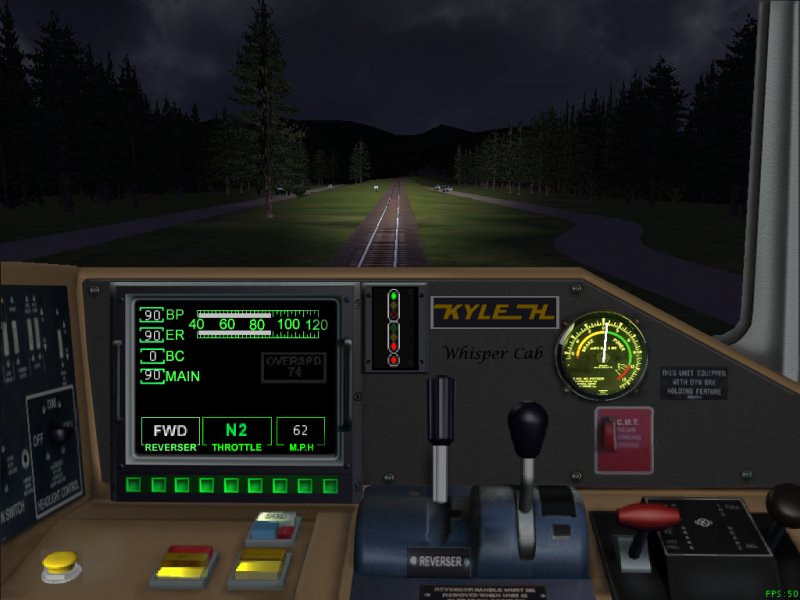
http://www.train-sim.com/dcforum/User_files/3d44cd892505385c.jpg
Printer-friendly page | Edit | Reply | Reply With Quote | Top
Awesome. If I didn't know better, I'd say that was an original un-tweaked shot. The controls match perfectly and the dash lighting looks very natural. You keep raising the bar, Kyle!The night-time 30000 should be done in a few days. I'm re-doing all the animation frames, as the shadows are different to the daytime (more light from inside the cab). Plus I'm trying a few new tricks with alpha masks, controlled by the light switch Seeing the quality work that guys like you and Chris produce inspires me to keep learning and maybe push the MSTS envelope a little.Best regards, Jimi
[ Home | MSTS Forum | MSTS FAQ | File Library ] Copyright © 2002 by Nels Anderson. All Rights Reserved.
Restored from the Train-Sim.Com archive, captured October 2, 2002. About this archive.