Message Areas - "Tachymeter with moving scale"
Train-Sim.Com Message Areas
"Tachymeter with moving scale"
Email this topic to a friend
Printer-friendly version of this topic
Bookmark this topic (Registered users only)
Previous Topic | Next Topic Conferences MSTS Cab Design (Protected) Original message
pierregtr (7 posts)
Apr-20-02, 04:55 AM (EST) "Tachymeter with moving scale" Hi Cab designers!For my new model (french parisian suburban EMU MI79), I needed a linear tachymeter like in actual cab. But never see in MSTS: static pointer and moving scale behind a small window. So I present my design to share with you:
With some efforts it is possible with superposition of two gauges: a static and a moving. With such a display don't use the Cab Editor. It's more destructive than usefull!!! Positionning and adjusting sizes are "by hand" and painfuly made... The result isn't perfect but it's running.See corresponding lines in my cvf file:
......
Gauge ( <--- first the dynamic one
Type ( SPEEDOMETER GAUGE )
Position ( 100 292 200 26 )
Area ( 0 0 255 26 )
Graphic ( bandeta.ace )
Style ( POINTER )
ScaleRange ( 0 150 )
ZeroPos ( 0 )
PositiveColour ( 1
ControlColour ( 0 0 0 )
)
NegativeColour ( 0 )
Orientation ( 0 )
DirIncrease ( 1 )
Units ( KM_PER_HOUR )
)
Gauge ( <--- and the static one
Type ( SPEEDOMETER GAUGE )
Position ( 186 279 32 32) <-- fictious bitmap ace size needed?
Area ( 0 0 400 60)
Graphic ( indic_ro.ace )
Style ( POINTER )
ScaleRange ( 0 15000 ) <-- to stay in place!!
ZeroPos ( 0 )
PositiveColour ( 1
ControlColour ( 0 0 0 )
)
NegativeColour ( 0 )
Orientation ( 0 )
DirIncrease ( 1 )
Units ( KM_PER_HOUR )
)
....The final model will be available soon first on my website.PierreG
http://ajtrainsim.free.fr/
Alert Edit | Reply | Reply With Quote | Top
Table of Contents
Subject Author Message Date ID RE: Tachymeter with moving scale samspade Apr-20-02 1 RE: Tachymeter with moving scale pierregtr Apr-20-02 2 RE: Tachymeter with moving scale jtr1962 Apr-20-02 3 RE: Tachymeter with moving scale Johansteam Apr-22-02 4 RE: Tachymeter with moving scale jtr1962 Apr-24-02 5
Lobby | Topics | Previous Topic | Next Topic
Messages in this topic
samspade (282 posts)
Apr-20-02, 08:40 AM (EST) 1. "RE: Tachymeter with moving scale" This goes to show that you cannot say "It can't be done" until you try everything. An elegant solution to the problem! Well done and thanks for sharing the process.One suggestion - you set the range for the static gauge as 0 to 15000 - Waht was wrong with 0 to 0?-------SamSpade--------
---"Power for You"--- Remove | Alert Edit | Reply | Reply With Quote | Top
pierregtr (7 posts)
Apr-20-02, 08:54 AM (EST) 2. "RE: Tachymeter with moving scale" Because with Scalerange( 0 0 ) MSTS don't display the gauge!PierreG
http://ajtrainsim.free.fr/
Remove | Alert Edit | Reply | Reply With Quote | Top
jtr1962 (103 posts)
Apr-20-02, 10:22 AM (EST) 3. "RE: Tachymeter with moving scale" I've thought of doing something similar to what you did, but never actually tried it out. From what I understand, the gauges in the TGV are of the same type. Anyway, congratulations on making it work. For the static display, why don't you use an overspeed display or alerter or something else static. I think it would work with just one frame, or if you must have 2(one for each state), just repeat the same image twice. When I have time, I'm going to try that on the Thalys cab.Another thing I wonder is if it is possible to choose a different font(or even a custom font) for the digital gauges? I'm tired of seeing the same font over and over in every cab, especially since the font they used is really only appropriate for computer screen displays, rather than the 7-segment displays frequently used in cabs. I've dug around to see where the font is specified with no luck so far. Remove | Alert Edit | Reply | Reply With Quote | Top
Johansteam (155 posts)
Apr-22-02, 10:19 AM (EST) 4. "RE: Tachymeter with moving scale" Hi PierreG,
I must echo SamSpades words as well as, say "Thanks" for sharing with the community. Great work.
Johan. Remove | Alert Edit | Reply | Reply With Quote | Top
jtr1962 (103 posts)
Apr-24-02, 10:50 AM (EST) 5. "RE: Tachymeter with moving scale" LAST EDITED ON Apr-24-02 AT 11:19 AM (EST)LAST EDITED ON Apr-24-02 AT 11:18Â AM (EST)Another way to get a static display is to use the following: Lever (
Type ( TRAIN_BRAKE LEVER )
Position ( 217 290 256 53 )
Graphic ( speedo_static1.ace )
Style ( SPRUNG )
MouseControl ( 0 )
NumFrames ( 1 1 1 )
NumPositions ( 1 1 )
NumValues ( 1 0 )
Orientation ( 0 )
DirIncrease ( 0 )
ScaleRange ( 0 1 )
)You can also treat the static display as a throttle. If you put MouseControl ( 1 ) instead of MouseControl ( 0 ) you can even use that portion of the cabview to control the train brakes(or throttle). The only drawback to doing it this way is that you can't use the Area( 0 0 x y ) to resize the graphic, as you can by treating it like a speedometer.A couple of things I discovered playing around with the Eurostar cab:1)Any graphic with a dimension larger than 256 pixels will not display at all in the cab. This precludes making very long scales using only one graphic.2)Due to the 256 pixel limitation, when using very long scales you need to use at least three static displays to completely cover your moving scale. You can cover over anything-gauges, levers, etc. However, in order to prevent partially obscuring the display of any other gauges or levers, and also to properly cover up the moving scale, the order of the displays in the .cvf file is critical. All of the moving displays must be the very first things in the CabViewControls section of the .cvf file. The static displays must follow immediately after, and then you can have the remainder of the other controls and displays. Apparently, the displays are overlayed in the order in which they are listed, which is a good thing since it gives you control if you want to partially obscure a particular display with something else.3)In order to get the scales to display without any banding or artifacts while moving you need to use the area function to resize the graphics since the graphic size in the .cvf file is based on a 640x480 cab. For example, a 256x42 scale will display as 409.6 x 67.2 in a 1024x768 cab. In order to display properly you need to resize the x dimension to display as a integer number of pixels in the 1024x768 cab, which means that the original dimension must be multiplied by either .625, 1.25, 1.875, etc. For a 256x42 scale, I used Area( 0 0 160 23 ). The last number is not critical. You can alter it to make the scale( and lettering) appear taller or shorter. However, the next to last number must be one of the multiples mentioned in order to display correctly in a 1024x768 cab. I found a multiplier of 0.625 works best since you end up using the full resolution of the display.4)In order to get longer scales it is possible to have several scales synchronized, and with different speed ranges. How to do this seamlessly is rather complicated, and the scales must overlap by a certain number of pixels. However, it does work, and since no more than three scales are moving at any one time, it doesn't impact frame rates noticeably. I used 8 scales on the Eurostar cab to display 0 to 600 km/hr with a 1 km/hr scale division. A closeup of the result is shown below: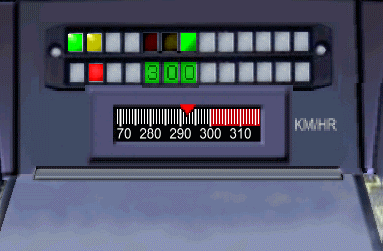 The result is completely seamless when moving. I plan to tweak it a little more, and eventually upload the completed modification, and hopefully an easy to understand explanation of how to synchronize multiple scales.
Remove | Alert Edit | Reply | Reply With Quote | Top
Lock | Archive | Remove
Lobby | Topics | Previous Topic | Next Topic
Restored from the Train-Sim.Com archive, captured May 4, 2002. About this archive.