Message Areas - "GO Transit spec FP7Am cab in the works"
Train-Sim.Com Message Areas
"GO Transit spec FP7Am cab in the works"
Email this topic to a friend
Printer-friendly version of this topic
Bookmark this topic (Registered users only)
Previous Topic | Next Topic Conferences MSTS Cab Design (Protected) Original message
TrirailF40PHL (132 posts)
Dec-22-01, 10:29 PM (EST) "GO Transit spec FP7Am cab in the works" As you can see, there is much more work to be done. The bell button is now animated. The cab is too light and I need to animate the brake, train brake, and throttle contorls (This will be HARD.) The view is from the only remaining GO Transit FP7Am surviving, 904. Kurt
Kurt
www.klwtrainsim.com Alert Edit | Reply | Reply With Quote | Top
Table of Contents
Subject Author Message Date ID RE: GO Transit spec FP7Am cab in th... samspade Dec-23-01 1 RE: GO Transit spec FP7Am cab in th... TrirailF40PHL Dec-23-01 2 RE: GO Transit spec FP7Am cab in th... samspade Dec-24-01 3 RE: GO Transit spec FP7Am cab in th... TrirailF40PHL Dec-24-01 4
Lobby | Topics | Previous Topic | Next Topic
Messages in this topic
samspade (151 posts)
Dec-23-01, 02:16 AM (EST) 1. "RE: GO Transit spec FP7Am cab in the works" Nice starting shot, Kurt. Really shows the layout well.Don't forget to adjust the viewport start points in the top left where you can see the yellow border. I imagine you haven't look at that aspect as yet - it is one of the last things I do.-------SamSpade--------
---"Power for You"--- Remove | Alert Edit | Reply | Reply With Quote | Top
TrirailF40PHL (132 posts)
Dec-23-01, 09:51 AM (EST) 2. "RE: GO Transit spec FP7Am cab in the works" Thanks for the input Sam. I already knew that the viewports on both the side views and the cabview need to be adjusted to full screen, but I don't really know how to do that. Well, back to the actual cab talk...I finally got the front window the shape and angle of the prototype, now it's to sharpen the details in the cab. The problem I am having though, is that DXTBmp keeps fuzzing the image. I use DXTBmp to add transparencies. It's an FS version of TGAtool, but it opens ACE files, and you can send transparencies to the editor (I use MSPaint). Well, now the secret is out how I use MS paint and can have my transparencies too. I think TGAtool will get this feature soon. Here is a pic of my updated cab: 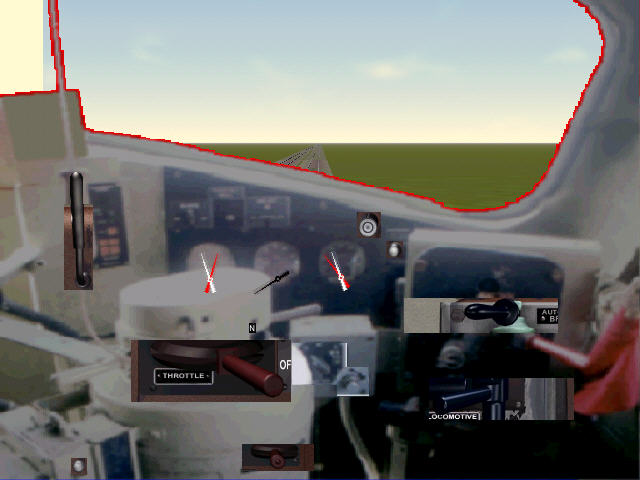 Kurt
Kurt
www.klwtrainsim.cjb.net Remove | Alert Edit | Reply | Reply With Quote | Top
samspade (151 posts)
Dec-24-01, 02:06 AM (EST) 3. "RE: GO Transit spec FP7Am cab in the works" The viewports are easy to fix - either under File/Properties in the editor or just manually altering the values in the cvf file.If the DXTBmp program keeps fuzzing the image, have you thought about using it to create the file with transparency and then using TGATool2 to continue with the editing changes? TGATool2 does not seem to affect the images in this way.-------SamSpade--------
---"Power for You"--- Remove | Alert Edit | Reply | Reply With Quote | Top
TrirailF40PHL (132 posts)
Dec-24-01, 11:40 AM (EST) 4. "RE: GO Transit spec FP7Am cab in the works" Problem is Sam, that when I use it to create the transparency, it fuzzes it up! No way to get around it until a new TGATool is released.Kurt Remove | Alert Edit | Reply | Reply With Quote | Top
Lock | Archive | Remove
Lobby | Topics | Previous Topic | Next Topic
Restored from the Train-Sim.Com archive, captured January 28, 2002. About this archive.