Notice to all visitors and members of the Train-Sim.Com message forums: If you plan on using a signature banner in your posts, we would like to remind you that there is a maximum size for banners. That maximum is 450 pixels wide by 120 pixels high, and not to exceed 25k. Your compliance is appreciated. FORUM RULES Problems? There are two common reasons for problems with logging in and posting messages. The first is that you are running a firewall that prevents your messages from being sent to the server. The other is that you have cookies disabled; the DCForum software requires cookies to work properly.
I notice sometimes if msts locks up and I have to ctrl-alt-del I notice that it says I usually have 37 running processes. Can this slow down msts?? If so, how could I shut them down to increase performance.
>If so, how could I >shut them down to increase performance. Select a Process, then click the "End Process" button in the "Processes" tab.
-----You are reading my signature now, don't waste your time reading it!----- Or probably, maybe you should waste your time reading it. Eh, where did my signature go? Oh, here it is, the one you are reading right now? Can't you see it? I know I know, it's probably too bright to see it. Hey, look at my avatar, nice right? I drew it with my own hands holding the mouse in Paint, with the pencil tool(and the Filling tool!)! It's a picture of me in Planet Stooopid, where everything is the same as what you call "Earth" except that we are called "aliens" in your planet. Anyway, I warned you not waste time reading my signature! You have just wasted probably about 30 seconds reading it, where you could have spent the time doing better things, like maybe reading the next post below if there is one...
In theory, any running process could slow down MSTS because they might be stealing precious CPU cycles. In practice, they don't make a noticable difference on my machine, but I have a pretty streamlined system. (check the black viper site already mentioned for services you can nuke)As for shutting them down before runnin MSTS, do a google search for "end it all". This handy little utility will shut down all unnecessary services with the click of a button. Works great.-Jeff
These are my WIN-XP MUST HAVE SERVICES running:The two programmes at the top of the list are being used to show this Screen shot. The third is my PIEngineering X-Keys Keypad, or could also be a RAILDRIVER if you got one. If you Task Manager End Process anything you may need again, simply Re-Start your machine.O t t o
>Well the EndItAll2 that I downloaded did not have Win XP as >a supported OS so I didnt use it. End it all 2 works just fine with XP. I use it all the time.-Jeff
Hehehe, this is going to sound really stupid, but thanks guys! I never new about this option!! I'm rather new to XP. I must say MSTS and Battlefield run A LOT quicker now that I can shut down the programs/crap that I do not need.>Mike Forster< Perth, Western Australiapacificnational_nr103@hotmail.com


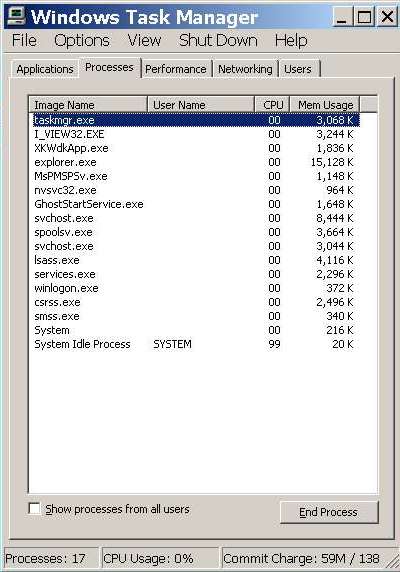 The two programmes at the top of the list are being used to show this Screen shot. The third is my PIEngineering X-Keys Keypad, or could also be a RAILDRIVER if you got one. If you Task Manager End Process anything you may need again, simply Re-Start your machine.O t t o